Getting started with Self-serve sample
Self-serve sample gives you on-demand access to global respondents with full control over your respondent sourcing.
Choose Self-serve sample A and B to invite respondents from global panel networks, or Self-serve sample C when you need ID-verified professionals and niche respondents.
Whichever option you choose, you can set your targeting criteria, required number of responses, and your bid per complete response to launch a study. The data collection process begins immediately, eliminating the traditional delays of manual quoting and fielding.
Choose your Self-serve sample source
Conjointly offers three Self-serve sample options: A, B, and C. All three are sourced from different sets of panels and offer a wide range of targeting filters, but available filters may differ between options.
Fast. Global. Great for targeting consumers (location, demographics, deep profiling data). Set your own price and quotas.
Urgent. Global. Good for targeting consumers (location, demographics, profiling data). Set your own price and quotas.
Concentrates on English speakers. Good for targeting B2B, specially skilled, domain-expert, or just general-audience respondents. Respondents are ID-verified.
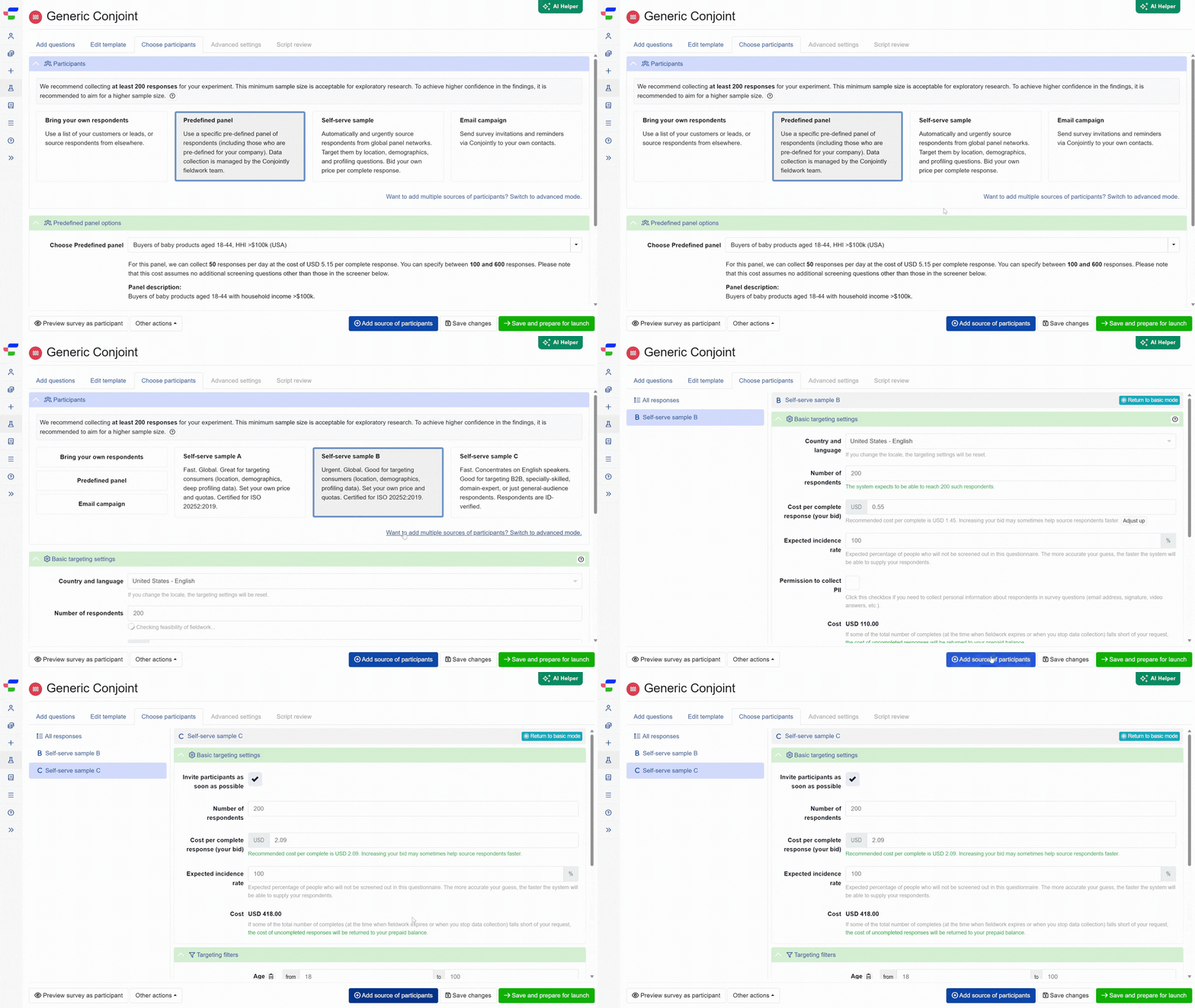
You can include multiple Self-serve sample sources (any combination of A, B, and C) in a single experiment via the advanced mode. This approach allows you to include multiple instances of Self-serve sample, Predefined panels, and more.
How Self-serve sample A, B, and C differ
| Self-serve sample A | Self-serve sample B | Self-serve sample C | |
|---|---|---|---|
| Best for | Fast, general-audience research | Urgent, general-audience research | B2B, specialist, or domain-expert research |
| Targeting filters for consumers | Yes | Yes | Yes |
| Targeting filters for B2B or niche respondents | Limited | Limited | Extensive |
| Invite as soon as possible | Yes | Yes | Yes |
| Schedule fieldwork up to 30 days ahead | Yes | Not available | Not available |
| Responses within hours | Yes | Yes | Yes |
| Respondents’ identity verification | No | No | Yes |
| Automated quality checks | Yes | Yes | Yes |
| User review and reconciliation | Yes | Yes | Yes |
How to take control of your respondent sourcing
Watch our demo video to learn how to manage settings and optimise respondent sourcing with Self-serve sample.
Configure basic targeting settings
- When using Self-serve sample A or B, start by selecting the country and language of your desired respondents. For Self-serve sample C, you can target countries and languages through filters instead.
- Self-serve sample A lets you choose to invite participants as soon as possible or specify desired fieldwork dates within a 30-day window. Self-serve sample B and C always invite participants as soon as possible.
- Specify the number of respondents needed.
- Enter your estimated cost per complete response. The system will recalculate and recommend an updated cost estimate whenever you change any setting.
- Enter the expected incidence rate, or the expected percentage of people who will not be screened out of the survey. The button appears when screen out questions, Video Responses, or device specifications are included in the experiment, allowing you to adjust the incidence rate to a more accurate estimate.
- Check the permission to collect PII checkbox if personal respondent information is required. This is required for surveys that contain video responses or collect email addresses.

Set approximate quotas and targeting filters
For Self-serve sample A and B, you can configure multiple quotas and apply filters within each quota. To add a new quota, duplicate the first one and customise it accordingly. All quotas must have distinct filters.

For Self-serve sample C, add your targeting filters directly. Set the desired distribution by clicking and entering the proportion you want across the answer options. At least two rows must be defined whenever a desired distribution is enabled.
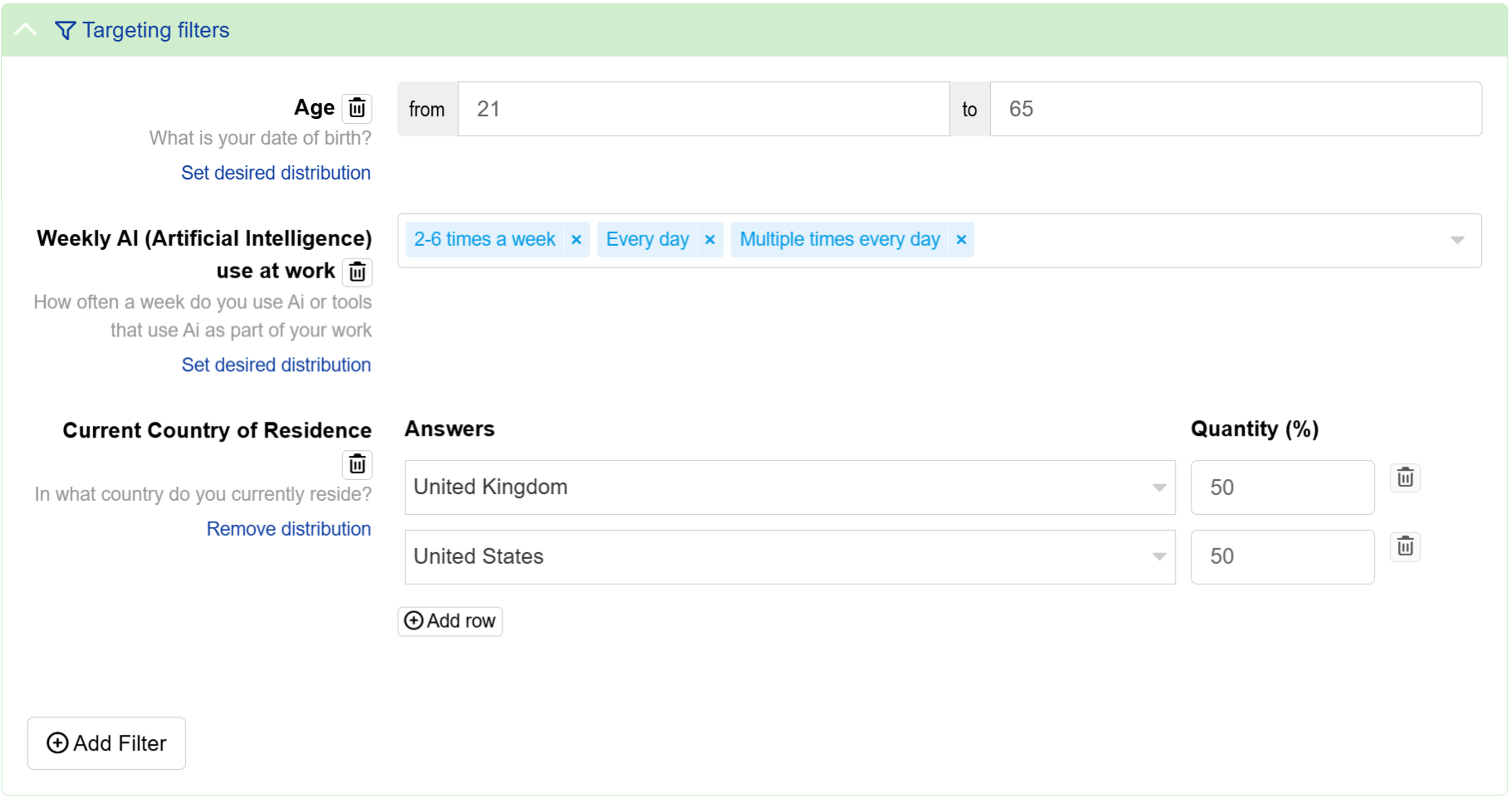
To add filters:
- Click the button.
- Select your filtering question from the Category tab or All tab, or use the search bar to find it directly.
- Select your desired answers for the selected question.
For Self-serve sample A and B, you may add up to five filters in each quota.
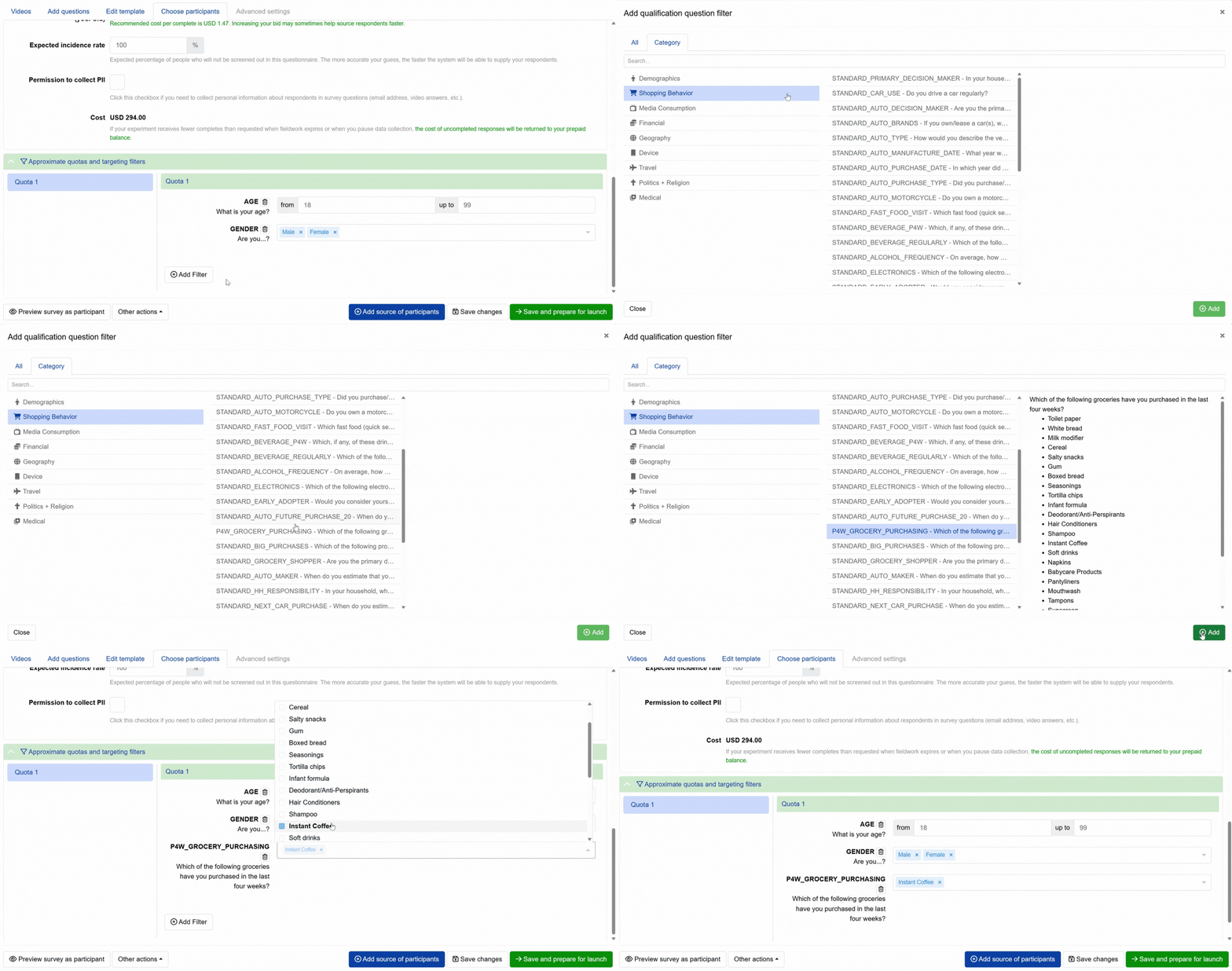
The system will recalculate and display the updated cost estimate for your Self-serve sample source whenever you change any setting. It will also evaluate the feasibility of the parameters set.
Feasibility check results
The system will try to estimate the feasibility of your targeting settings given your bid in real time. The feasibility check may show:
- All good: The targeted number of responses and cost per complete are feasible based on the parameters set. (But you may optionally increase your bid to expedite data collection.)

- Cost per complete is too low: The targeted number of responses is feasible, but the set cost per complete is too low. You should increase your bid to the minimum recommended cost per complete to proceed.
- Insufficient feasibility or Unable to determine feasibility: The targeted number of responses is not feasible based on the parameters set. To overcome this, you can:
- reduce the total number of responses,
- adjust the quotas and filters,
- consider other Self-serve sample options, or switch to Conjointly’s fully-managed Predefined panels. Either select from Predefined panels in your account or contact us to build a custom panel tailored to your needs.
- Quota sample sizes do not match total number of responses: The sample sizes of all the quotas do not match the total number of responses. You can increase the total number of responses or adjust the quotas to proceed.
FAQs
How performant is Self-serve sample?
The performance of Self-serve sample varies depending on your targeting criteria, bid, country, and other factors. It also varies over time:
- For example, often a lower bid is sufficient to get responses during certain times of the week (like Mondays, Tuesdays, and Wednesdays) compared to others (like Thursdays, Fridays, and weekends) because most researchers tend to launch surveys towards the end of the week.
- In December, it is recommended to increase bid by at least 50% because researchers at some companies tend to bid higher in December to use up their budget before it expires at the end of the year.
- The popularity of specific panel apps and websites ebbs and flows over time, affecting how quickly respondents can be recruited from them.
Based on data from January 2024 till early December 2025, we find that both Self-serve sample A and B perform similarly on most metrics but there is a lot of variability across individual launches. Below are some key performance metrics for both Self-serve sample options:
| Metric | Self-serve sample A | Self-serve sample B |
|---|---|---|
| Successful launches (i.e. percentage of launches with target N>10 where we delivered >10) | 84% | 86% |
| Launch delay (minutes from survey launch to first entry): 20th percentile | 0.8 minutes | 0.5 minutes |
| Launch delay (minutes from survey launch to first entry): median | 1.5 minutes | 0.8 minutes |
| Launch delay (minutes from survey launch to first entry): 80th percentile | 5.4 minutes | 2.1 minutes |
| Speed of data collection: 20th percentile | 3 completes per hour | 5 completes per hour |
| Speed of data collection: median | 74 completes per hour | 44 completes per hour |
| Speed of data collection: 80th percentile | 432 completes per hour | 248 completes per hour |
| Delivery vs. the target sample size by the end of the project: 20th percentile | 30% | 27% |
| Delivery vs. the target sample size by the end of the project: median | 101% | 109% |
| Delivery vs. the target sample size by the end of the project: 80th percentile | 121% (mostly on small target N) | 134% (mostly on small target N) |
Self-serve sample C was launched in July 2026 and performance benchmark data isn’t available yet.
What to do if data collection is stalling?
The five most common reasons why not enough respondents are coming into your survey:
- It’s still too early. Sometimes responses will come in not immediately, but within an hour or so. If it’s nighttime in the country where you are collecting responses, they will tend to come in slower.
- Your bid is not sufficient and needs to be increased to attract more people.
- Your quotas and targeting filters are too narrow (i.e. panels do not have enough people who have been profiled on your selected filters).
- Your screening questions are too strict, resulting in overly high drop-off rates.
- The actual incidence rate is much lower than the specified value, leading panels to reduce the flow of respondents to protect respondents’ experience.
If you’ve waited for a couple of hours and see too few responses coming in or completing your survey, we recommend that you re-launch data collection with a higher bid or with different targeting options.
To do so, try these steps:
- Pause data collection on the current source. This action will return unused money into your balance.
- Make a copy of the self-serve sample source within the same experiment.
- Modify it:
- Put a higher bid, or
- Put different targeting criteria, or
- Edit your screening questions, or
- Decrease the specified incidence rate, or
- Switch to other Self-serve sample options.
- Relaunch. Make sure to use your prepaid balance when you do that (by ticking the box “Use prepayment balance and bonus credits” on check-out).
If that does not work, please send your panel request. We should be able to assist you with a managed sample solution.
You can also read more about how to monitor and maintain data quality when using Conjointly’s Self-serve sample options.
Can I combine filters or quotas across Self-serve sample A, B, and C?
No, because each of these options draws from different panel providers. If you can’t find a specific targeting option in one, try another.
You can, however, use advanced mode to manage your sample sources more flexibly:
- Combine sources: Mix any combination of A, B, and C within a single experiment.
- Collect data over time: For time series research, duplicate a Self-serve sample A source to maintain consistent definitions and schedule collection in advance.
How can I target countries or languages in Self-serve sample C?
With Self-serve sample C, you can apply country and language filters to target respondents across multiple countries at once.