Technical and methodological limits on Conjointly
Conjointly has limits on experiment complexity, both for technical reasons and to preserve the user experience of both users and respondents.
Each experiment type and analysis method on Conjointly supports a maximum level of complexity, referred to as the technical limit. This is a hard limit on the maximum number of attributes, levels, etc., that is supported.
While the technical limit is the maximum permissible limit for each method, creating experiments with this level of complexity can result in other issues due to hardware limitations of the Conjointly user and survey respondents. These issues may include the experiment settings page crashing due to a lack of user memory, or an excessive loading time for respondents trying to access the questionnaire.
To ensure an optimal experience for both users and survey respondents, Conjointly establishes a recommended limit on the maximum number of attributes, levels, etc., included in experiments. These limits are derived from analysing the performance of experiments, using an environment similar to that of the average user of the platform.
Supported browsers
| Platform | Operating System | Browser | Disallowed versions | Supported version |
|---|---|---|---|---|
| Desktop | Chrome | < 60 | 122 + | |
| Desktop | Edge | < 79 | 122 + | |
| Desktop | Firefox | < 60 | 123 + | |
| Desktop | Opera | < 60 | 107 + | |
| Desktop | Internet Explorer | Any | None | |
| Desktop | macOS (10.15.4) | Safari | < 8 | 17.4 + |
| Mobile | Android | Chrome | < 60 | 144 + |
| Mobile | Android | Firefox | < 60 | 147 + |
| Mobile | Android | Android Browser | < 60 | 144 + |
| Mobile | Android | Samsung Internet (except Dark Mode) | < 8 | 24 + |
| Mobile | Android | Opera Mobile | < 40 | 80 + |
| Mobile | iOS | Safari | < 8 | 17.4 + |
Versions that fall between the disallowed and supported ranges are not supported.
Survey participant limit on Conjointly
Surveys on Conjointly have a recommended entry limit of 100,000 total participants. Exceeding this limit may result in excessive loading times for users navigating the report. Experiments have a technical entry limit of 300,000 respondents. Once exceeded, experiments will no longer be able to continue collecting responses.
Audience size limit on Conjointly
My Audiences on Conjointly can inlcude a maximum of 50,000 contacts.
Maximum number of segments per survey
You can use Segmentation to categorise your respondents based on different variables and break down your report by segments accordingly. Conjointly supports a maximum of 50 segments per report.
Methodological concerns
Both the technical and recommended limits on Conjointly were designed to be considerably higher than that required for the vast majority of research projects. When approaching these limits, consider that designing an experiment in such a way is likely not methodologically recommended. In these scenarios, considering alternative approaches will likely result in more robust results and less technical concerns.
For example:
- When you are looking to run a Brand-Specific Conjoint with close to 100 levels, consider a 2-stage study:
- Using a methodology such as a Generic Conjoint or Claims Test to reduce the number of levels.
- Running Brand-Specific Conjoint on the winning features of stage 1.
- When you are setting up a Brand-Price Trade-Off with a large number of SKUs (e.g. 100+ SKUs), consider reducing that number by:
- Removing SKUs that have small volume shares (less than 1%) with the assumption preferences for those SKUs will be represented by the larger SKUs within the brand. You should do this consistently across your brands as well as competitor brands.
- Only including SKUs with similar pack sizes. Apart from reducing the number of SKUs, adopting this guideline will often lead to making your results more robust. For example, a single pack 100ml SKU will likely be in minimal competition with a multipack 8x100ml SKU. There are likely to be purchased in different location as well as occasions, which will likely introduce some noise to the results.
- Removing SKUs that are from a different category as the main category you are focusing on.
If you are in doubt when setting up your studies, please do not hesitate to book a call with one of our researchers.
Technical and recommended limits by method
The performance of an experiment depends on its overall complexity, considering all settings available. These technical and recommended limits refer to individual settings, while keeping other settings at a “reasonable” level. For example, additional complexities may be introduced when you include settings that restrict the design of the study such as prohibited pairs, DIY experimental customisation, etc. Such restrictions might also affect the performance of your experiment even though limits have not been reached.
Hierarchical Bayes participant limit
Conjointly uses Markov Chain Monte Carlo Hierarchical Bayes (MCMC HB) estimation for discrete choice experiments (DCE). For all experiments containing DCE methods on Conjointly the recommended limit is 10,000 complete responses. Exceeding 10,000 complete responses is considered bad practice, and may result in technical issues.
Generic Conjoint
| Technical limit | Recommended limit | |
|---|---|---|
| Total number of attributes | 107 | 107 |
| Total number of levels | 966 | 500 |
| Number of levels in an attribute | 300 | 300 |
Brand-Specific Conjoint
| Technical limit | Recommended limit | |
|---|---|---|
| Total number of attributes | 107 | 107 |
| Total number of levels | - | 300 |
| Number of levels in an attribute | 300 | 300 |
| Number of combinations | 1000 | 1000 |
| Number of brands | 40 | 40 |
Number of combinations
The number of combinations refers to the number of unique feature combinations that can be shown across all brands in the experiment. Only attribute levels marked as applicable in the Applicability of levels across brands table are included in the calculation.
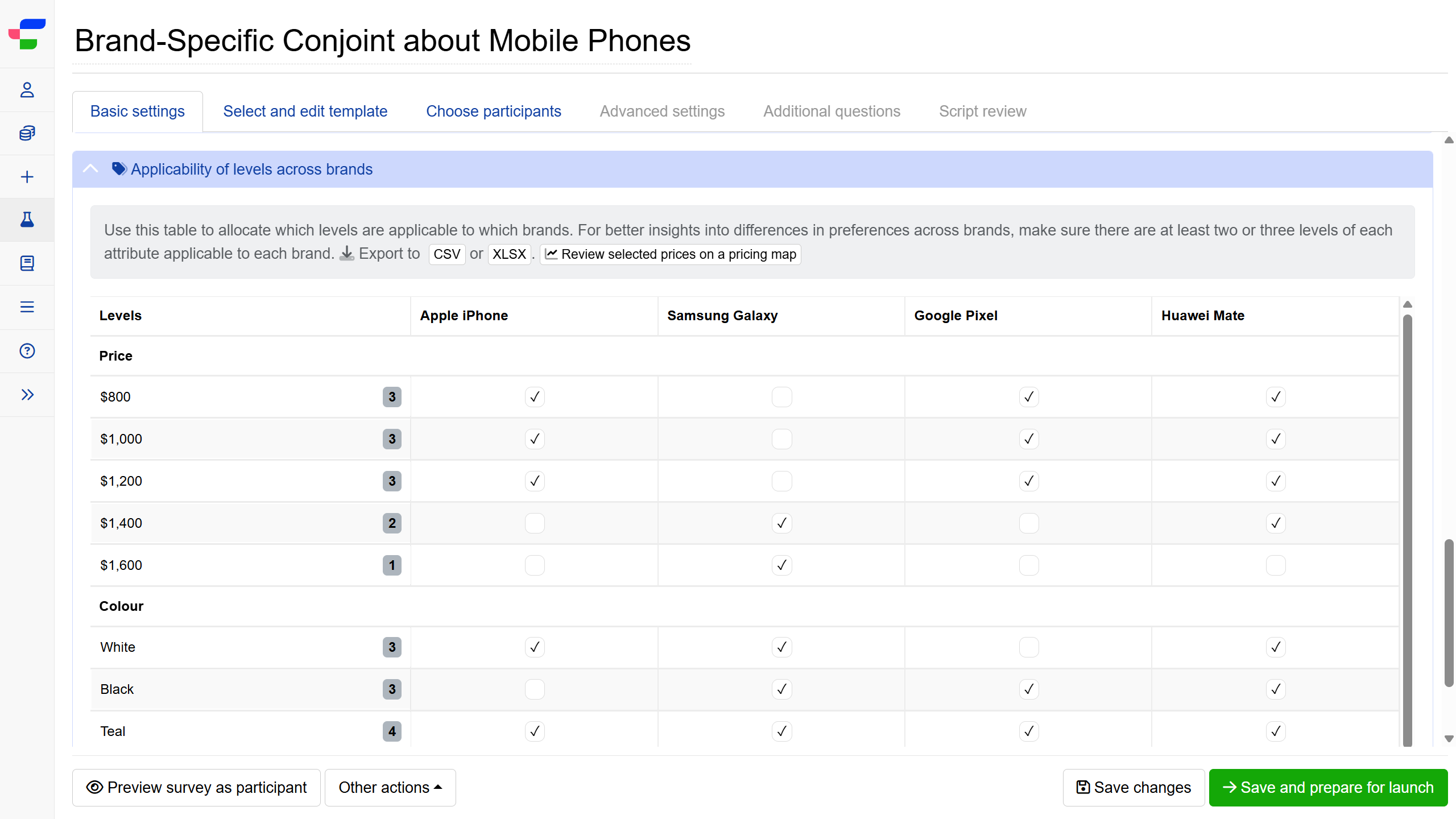
The system counts the total variations possible across all brand levels:
- Take the number of brand attribute levels as your base number.
- For each non-brand attribute, multiply the base by (number of levels - 1).
- Add all these values together.
If the number of combinations exceeds 1000, you’ll receive a validation warning.
For a calculation example, consider a Brand-Specific Conjoint experiment where all attribute levels are applicable to all brands and it consists of:
- 16 different mobile phone brands
- 6 price levels (e.g., $800, $1000, $1200, $1400, $1600, $1800)
- 1 feature attribute with 5 levels (e.g., colour: Red, Blue, Green, Yellow, Black)
- 55 additional features with 2 levels each (e.g., storage: 500GB/1TB, Water-resistant: Yes/No, etc.)
Calculation:
| Attribute | Number of levels | Calculation | Number of combinations |
|---|---|---|---|
| Brand (base) | 16 | 16 | 16 |
| Price | 6 | 16 × (6-1) = 16 × 5 | 80 |
| Colour | 5 | 16 × (5-1) = 16 × 4 | 64 |
| 55 two-level features | 2 each | 16 × (2-1) × 55 = 16 × 1 × 55 | 880 |
Number of combinations: 16+80+64+880 = 1040 (exceeds the 1000 limit)
If your combinations total more than 1,000, reduce this count by marking fewer levels as applicable. Alternatively, consider running a preliminary Generic Conjoint or Claims Test study to identify high-importance feature attribute levels before proceeding with your Brand-Specific Conjoint.
MaxDiff Analysis
| Technical limit | Recommended limit | |
|---|---|---|
| Total number of attributes | 107 | 107 |
| Total number of levels | 966 | 500 |
| Number of levels in an attribute | 300 | 300 |
Brand-Price Trade-Off
| Technical limit | Recommended limit | |
|---|---|---|
| Current our brand’s SKUs + Current competitor SKUs | 300 | 100 |
| Total number of NPD SKUs | 50 | 50 |
| Total number of prices | 300 | 50 |
Monadic block
| Technical limit | Recommended limit | |
|---|---|---|
| Number of stimuli in a monadic block | 300 | 300 |
| Number of views in a monadic block | 10 | 7 |
Matrix grid
The matrix grid supports a maximum of 500 cells, calculated by multiplying the number of columns by the number of rows. This means the limits on columns and rows are interdependent, increasing one reduces the maximum allowable value of the other.
The following table illustrates the maximum number of rows based on the number of columns selected:
| Number of columns | Maximum number of rows | Total cells (columns × rows) |
|---|---|---|
| 3 | 166 | 498 |
| 4 | 125 | 500 |
| 5 | 100 | 500 |
| 8 | 62 | 496 |
| 10 | 50 | 500 |
| 15 | 33 | 495 |
| 20 | 25 | 500 |
The same principle applies when working from the number of rows. The following table illustrates the maximum number of columns based on the number of rows selected:
| Number of rows | Maximum number of columns | Total cells (rows × columns) |
|---|---|---|
| 3 | 166 | 498 |
| 4 | 125 | 500 |
| 5 | 100 | 500 |
| 10 | 50 | 500 |
| 20 | 25 | 500 |
TURF Analysis Simulator
| Technical limit | Recommended limit | |
|---|---|---|
| Number of columns (items) in import file | 100 | 100 |
| CSV import file size | 5 MB | 5 MB |
| Number of scenarios in the TURF simulator | - | 650 |
| Number of lines in import file | 20000 | 10000 |
Preference share simulator
| General technical limit for the size of the sent payload | Recommended limit | |
|---|---|---|
| Number of scenarios | 4000 KB | 50 (In one worksheet, but not more than 30 worksheets) |
| Number of worksheets | 4000 KB | 150 (with 10 scenarios in each worksheet) |
| Number of concepts | 4000 KB | 200 |
Time series analysis
| Technical limit | Recommended limit | |
|---|---|---|
| Number of waves | 200 | 200 |
Waves in a time series analysis cannot be scheduled less than 10 minutes apart. Attempting to configure waves below this interval will result in a validation error.
To learn more about the experimental design on Conjointly, please refer to the technical points on DCE with Conjointly.
Other experiment and feature limits
Image-based experiments
Images can be uploaded through the question’s text editor or the “Add image” button in Image heatmap questions. Supported formats include JPEG/JPG, PNG, GIF, and APNG.
The maximum image file size is 10MB. All uploaded images are automatically compressed to a maximum of 1200 px in height and width to ensure fast loading times for respondents.
If you need to use larger files, you can host them externally and insert the URL into the HTML code in the text editor, or contact support for assistance.
Video-based experiments
Videos can be uploaded through the question’s text editor in MP4 format. The maximum video file size is 300MB.
If you need to use larger video files, you can host them externally and insert the URL into the HTML code in the text editor, or contact support for assistance.
Video response duration length
Video responses in surveys on Conjointly can be between 6 to 300 seconds long.
Conversational surveys
Conversational surveys support between 2 to 100 comments per conversation.
Options limit by question type
The following table outlines the maximum number of options supported across different question types:
| Question type | Maximum number of options |
|---|---|
| Image heatmap question | 5 |
| Text highlighter question | 5 |
| Additional questions | 300 |
Export cart
When exporting your experiment data, the export cart has a limit of 1,000 items.
Question text limit
All question text fields have a character limit of 30,000.
LLM functionality fair use limits
All LLM functionality in the platform including AI-based survey creation, Insights Explorer’s LLM functionality, and Script review are subject to fair use limits. If you reach the usage limit, you will be notified and may need to wait before continuing or consider upgrading your licence.